Support your child's preparation for the CREST Cyber Olympiad (CCO) with expertly crafted sample papers for Grade 4. These free PDF downloads, complete with detailed solutions, are designed to build a strong foundation in cyber and computer science concepts.
Benefits of Practising CREST Cyber Olympiad Sample Papers for Grade 4 Gain a clear understanding of the exam format and question styles. Enhance problem-solving speed and accuracy with consistent practice. Identify strengths and areas that need improvement before the exam. Download Grade 4 CREST Cyber Olympiad Sample Paper (PDF) Download the CREST Cyber Olympiad sample paper for Grade 4 in PDF format to help your child prepare effectively and boost their confidence for the exam.
>> Join CREST Olympiads WhatsApp Channel for latest updates. Sample PDF of CREST Cyber Olympiad for Class 4:
If your web browser doesn't have a PDF Plugin. Instead you can Click here to download the PDF
Syllabus:
Section 1: Computer & IT
Computers
Hardware and Software
Operating System
Input and Output Devices
Primary and Secondary Memory
Bits, Bytes and Memory Size; RAM/ROM, Solid State Drive (SSD), Hard Disk Drive (HDD)
Keyboard
Function Keys
Shortcut Keys with Windows, CTRL, ALT, SHIFT, Function Keys
GUI Operating System and Desktop Management
Search Bar and Cortana
Settings: Date & Time, Languages, Display
Shortcut Icons and Creating Desktop Shortcuts
Context Menu: Display Settings, Personalization, Properties
Taskbar Settings, File Explorer, Notifications
RUN Dialog Box
Basics of Troubleshooting
Identify the Problem
Restart and Refresh
Word Processing / MS Word
Tab Menu: Home, Insert, Draw, Design
Find & Replace
Indents, Tabs & Line Spacing
Lists & Their Types
Inserting Images
Hyperlink
Introduction to Presentation Tool / MS PowerPoint
Slides: Add, Edit and Organize
Tab Menu: Home, Insert, Draw, Design (Themes)
Text Box and Editing
Adding and Editing Images and Shapes
Resize Tool
File Management
Types of Files & Folders with Extensions:
Text (.txt, .docx, .pdf),
Images (.jpg/.jpeg, .png, .gif),
Audio (.mp3),
Video (.mp4),
Presentations (.pptx)
Recycle Bin: Restore Files, Permanent Delete
Shortcut Keys: Cut, Copy, Paste, Undo, Redo
File Explorer
Internet – Web Browsers
WWW, Web Browsers, Search Engines: Google, Bing, Yahoo!
MS Paint (Advanced Tools: Colour Picker, Remove Background, Selection Tools)
Using View Tab: Ruler and Gridlines
Using Shift Key with Shapes, Line, Curve
Sample Paper
Previous Year Paper
Marking Scheme
Sample Questions
Q.1
Mia wants to highlight some text on her slide. Which tab contains the highlight tool?
a) D
b) A
c) B
d) C
Q.2
Your friend uses a web browser in ‘incognito mode’. What’s the main reason they might do this?
a) To make the internet faster
b) To block viruses
c) To use two screens
d) To browse without saving history
Q.3
Logan has finished his slide, but he wants to move it to the end. How can he do this quickly?
a) Press delete and add it again
b) Copy and paste the slide
c) Change the background colour
d) Drag it to the end of the slide list
Q.4
Why is the thesaurus tool used in MS Word?
a) Spelling suggestions
b) Grammar options
c) Synonyms and Antonyms
d) Spelling mistake correction
Q.5
Fill in the blank:
a) calcul
b) calculator
c) calc
d) calculation
Q.6
Which of the following is an example of a computer software?
a) Impact printer
b) Console
c) Device driver
d) Monitor
Q.7
Fill in the blank:
The ______ uses an addressing scheme known as URL that indicates the location of files or information on the web.
a) Java script
b) World Wide Web
c) SQL
d) String
Q.8
The Page Setup group is used to change the _____.
1. Default margins
2. Page size
3. Number of columns in a page
a) Only 1
b) Only 2 and 3
c) Only 1 and 3
d) 1, 2 and 3
Q.9
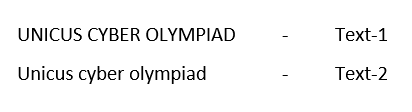
Which of the following change case option is applied to Text-1 to convert it to Text-2 as shown in the given snapshot in MS-Word 2010?
a) Lowercase
b) Uppercase
c) Toggle case
d) Sentence case
Q.10
Fill in the blank:
A Website address is a unique name that identifies a specific _______ on the Web.
a) Web browser
b) Website
c) PDA
d) Link
Your Score: 0 /10
Answers to Sample Questions from CREST Olympiads:
Q.1 b Q.2 d Q.3 d Q.4 c Q.5 c Q.6 c Q.7 b Q.8 d Q.9 d Q.10 b
Answers to Sample Questions from CREST Olympiads:
Q.1 : b | Q.2 : d | Q.3 : d | Q.4 : c | Q.5 : c | Q.6 : c | Q.7 : b | Q.8 : d | Q.9 : d | Q.10 : b