Prepare effectively for the CREST Cyber Olympiad (CCO) by practising with the Class 1 Cyber Olympiad sample papers. Download free sample papers with detailed solutions and help your child master essential cyber and computer concepts.
Why Practise CREST Cyber Olympiad Sample Papers for Class 1?
Getting familiar with the exam pattern and question types.
Improving time management skills for the Olympiad exam.
Identifying areas needing improvement.
Download CREST Cyber Olympiad Class 1 Sample Paper (PDF)
Download the CREST Cyber Olympiad Class 1 Sample Paper in PDF format to understand the exam pattern and question types.
>> Join CREST Olympiads WhatsApp Channel for latest updates. Sample PDF of CREST Cyber Olympiad for Class 1:
If your web browser doesn't have a PDF Plugin. Instead you can Click here to download the PDF
Syllabus:
Section 1: Computer & IT
Computers – A Smart Machine
What is a computer?
Basic Parts of Computer: Monitor, Keyboard, Mouse, CPU
Peripheral devices: Printer, Speaker, Headphone, Webcam
Where computers are used: school, home, work, entertainment
Basic Computer Operations
How to start and shut down a computer
Desktop: Folders, Cursor, Icons
Minimize, Maximize, Close
Fun with Apps
Typing tools (MS Word)
Applications in mobile & computer: YouTube Kids, Games, WhatsApp
Introduction to MS Paint
Opening and closing MS Paint
Drawing and painting using tools like brush, pencil, colours
Shapes: Circle, Rectangle, Square, Triangle
Section 2: Achievers Section
Higher Order Thinking Questions – Syllabus as per Section 1.
Questions are based on Windows 11.
Sample Paper
Previous Year Paper
Marking Scheme
Sample Questions
Q.1
Fill in the blank:
a)
b)
c)
d)
Q.2
Mario opened this app. What is this app called?
a) Camera
b) MS Paint
c) YouTube Kids
d) Game
Q.3
Wendy wants to close the window. Which button should she click?
a) D
b) C
c) B
d) A
Q.4
Which keyboard shortcut keys will you use to copy a text?
a) Ctrl + Z
b) Ctrl + C
c) Ctrl + X
d) Ctrl + V
Q.5
Which among the following options best fits the given description?
a)
b)
c)
d)
Q.6
Which device is used to type on a computer screen?
a) Monitor
b) Mouse
c) Keyboard
d) Speaker
Q.7
If you were to use the computer system for typing, select the one among the following options that you would not turn on:
a)
b)
c)
d)
Q.8
Which of the following mouse action is used to select an item?
a) Right click
b) Double click
c) Drag and drop
d) Left click
Q.9
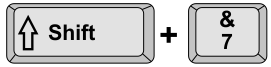
See the image and find out the output:
a) 7
b) &
c) 0
d) 7&
Q.10
Identify the brush tool from the following:
a)
b)
c)
d)
Your Score: 0 /10
Answers to Sample Questions from CREST Olympiads:
Q.1 c Q.2 a Q.3 b Q.4 b Q.5 a Q.6 c Q.7 d Q.8 d Q.9 b Q.10 c
Answers to Sample Questions from CREST Olympiads:
Q.1 : c | Q.2 : a | Q.3 : b | Q.4 : b | Q.5 : a | Q.6 : c | Q.7 : d | Q.8 : d | Q.9 : b | Q.10 : c